Python pandas データのイテレーションと関数適用、pipe
pandas ではデータを 列 や 表形式のデータ構造として扱うが、これらのデータから順番に値を取得 (イテレーション) して何か操作をしたい / また 何らかの関数を適用したい、ということがよくある。このエントリでは以下の 3 つについて整理したい。
- イテレーション
- 関数適用
pipe(0.16.2 で追加)
それぞれ、Series、DataFrame、GroupBy (DataFrame.groupbyしたデータ) で可能な操作が異なるため、順に記載する。
まずは必要なパッケージを import する。
import numpy as np
import pandas as pd
イテレーション
Series
Series は以下 2つのイテレーション用メソッドを持つ。各メソッドの挙動は以下のようになる。
図で表すとこんな感じ。矢印が処理の方向、枠内が 1 処理単位。
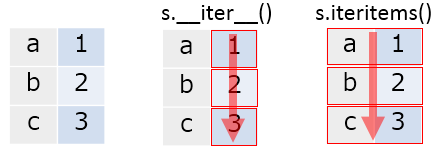
s = pd.Series([1, 2, 3], index=['a', 'b', 'c'])

for v in s:
    print(v)
# 1
# 2
# 3

for i, v in s.iteritems():
    print(i)
    print(v)
    print('')
# a
# 1
#
# b
# 2
#
# c
# 3
DataFrame
DataFrame は以下 3つのイテレーション用メソッドを持つ。同様に挙動を示す。
__iter__:DataFrameの列名 (columns) のみをイテレーションiteritems:DataFrameの列名と 列の値 (Series) からなるtupleをイテレーションiterrows:DataFrameの行名と 行の値 (Series) からなるtupleをイテレーション

df = pd.DataFrame({'A': [1, 2, 3], 'B': [4, 5, 6]}, index=['a', 'b', 'c'])
df
#    A  B
# a  1  4
# b  2  5
# c  3  6

for col in df:
    print(col)
# A
# B

for key, column in df.iteritems():
    print(key)
    print(column)
    print('')
# A
# a    1
# b    2
# c    3
# Name: A, dtype: int64
#
# B
# a    4
# b    5
# c    6
# Name: B, dtype: int64

for key, row in df.iterrows():
    print(key)
    print(row)
    print('')
# a
# A    1
# B    4
# Name: a, dtype: int64
#
# b
# A    2
# B    5
# Name: b, dtype: int64
#
# c
# A    3
# B    6
# Name: c, dtype: int64
GroupBy
__iter__:GroupByのグループ名と グループ (DataFrameもしくはSeries) からなるtupleをイテレーション

df = pd.DataFrame({'group': ['g1', 'g2', 'g1', 'g2'],
                   'A': [1, 2, 3, 4], 'B': [5, 6, 7, 8]},
                  columns=['group', 'A', 'B'])
df
#   group  A  B
# 0    g1  1  5
# 1    g2  2  6
# 2    g1  3  7
# 3    g2  4  8

grouped = df.groupby('group')

for name, group in grouped:
    print(name)
    print(group)
    print('')
# g1
#   group  A  B
# 0    g1  1  5
# 2    g1  3  7
#
# g2
#   group  A  B
# 1    g2  2  6
# 3    g2  4  8
関数適用
Series
Series の各値に対して 関数を適用する方法は以下の 2 つ。挙動はほぼ一緒だが、関数適用する場合は apply を使ったほうが意図が明確だと思う
Series.apply:Seriesの各値に対して関数を適用。Series.map:Seriesの各値を、引数を用いてマッピングする。引数として、dictやSeriesも取れる。

s = pd.Series([1, 2, 3], index=['a', 'b', 'c'])

s.apply(lambda x: x * 2)
# a    2
# b    4
# c    6
# dtype: int64

# apply の引数には、Series の値そのものが渡っている
s.apply(type)
# a    <type 'numpy.int64'>
# b    <type 'numpy.int64'>
# c    <type 'numpy.int64'>
# dtype: object

# 関数が複数の返り値を返す場合、結果は tuple の Series になる
s.apply(lambda x: (x, x * 2))
# a    (1, 2)
# b    (2, 4)
# c    (3, 6)
# dtype: object

# 結果を DataFrame にしたい場合は、返り値を Series として返す
s.apply(lambda x: pd.Series([x, x * 2], index=['col1', 'col2']))
#    col1  col2
# a     1     2
# b     2     4
# c     3     6

# map の挙動は apply とほぼ同じ (map では結果を DataFrame にすることはできない)
s.map(lambda x: x * 2)
# a    2
# b    4
# c    6
# dtype: int64

s.map(type)
# a    <type 'numpy.int64'>
# b    <type 'numpy.int64'>
# c    <type 'numpy.int64'>
# dtype: object

# map は 関数以外に、 mapping 用の dict や Series を引数として取れる
s.map(pd.Series(['x', 'y', 'z'], index=[1, 2, 3]))
# a    x
# b    y
# c    z
# dtype: object
DataFrame
DataFrame に対して 関数を適用する方法は以下の 2 つ。
DataFrame.apply:DataFrameの各列もしくは各行に対して関数を適用。行 / 列の指定はaxisキーワードで行う。DataFrame.applymap:DataFrameの各値に対して関数を適用。
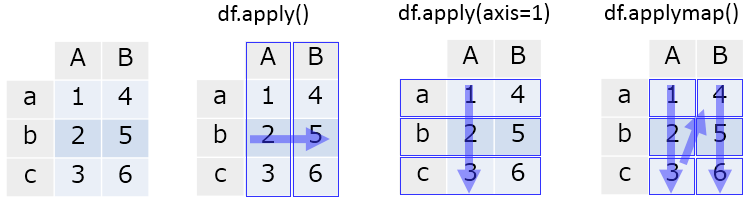
df = pd.DataFrame({'A': [1, 2, 3], 'B': [4, 5, 6]}, index=['a', 'b', 'c'])
df
#    A  B
# a  1  4
# b  2  5
# c  3  6

# 各列に対して関数適用
df.apply(lambda x: np.sum(x))
A     6
B    15
dtype: int64

# 各行に対して関数適用
df.apply(lambda x: np.sum(x), axis=1)
a    5
b    7
c    9
dtype: int64

# 各値に対して関数適用
df.applymap(lambda x: x * 2)
#    A   B
# a  2   8
# b  4  10
# c  6  12

# apply で適用される関数には、各列もしくは各行が Series として渡される
df.apply(type)
# A    <class 'pandas.core.series.Series'>
# B    <class 'pandas.core.series.Series'>
# dtype: object

# applymap で適用される関数には、値そのものが引数として渡される
df.applymap(type)
#                       A                     B
# a  <type 'numpy.int64'>  <type 'numpy.int64'>
# b  <type 'numpy.int64'>  <type 'numpy.int64'>
# c  <type 'numpy.int64'>  <type 'numpy.int64'>
GroupBy
GroupBy については、GroupBy.apply で各グループに関数を適用できる。
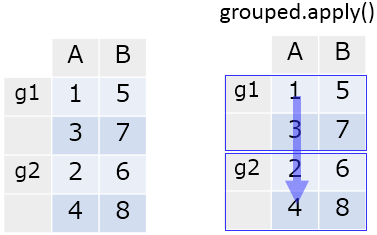
df = pd.DataFrame({'group': ['g1', 'g2', 'g1', 'g2'],
                   'A': [1, 2, 3, 4], 'B': [5, 6, 7, 8]},
                  columns=['group', 'A', 'B'])
df
#   group  A  B
# 0    g1  1  5
# 1    g2  2  6
# 2    g1  3  7
# 3    g2  4  8

grouped = df.groupby('group')

grouped.apply(np.mean)
#        A  B
# group
# g1     2  6
# g2     3  7
補足 処理最適化のため、対象となるグループの数 == 関数適用の実行回数とはならないので注意。関数中で破壊的な処理を行うと意図しない結果になりうる。
# 適用される関数
def f(x):
    print('called')
    return x

# グループ数は 2
grouped.ngroups
# 2

# f の実行は 3 回
grouped.apply(f)
# called
# called
# called
pipe
先日 リリースされた v0.16.2 にて pipe メソッドが追加された。これは R の {magrittr} というパッケージからインスパイアされたもので、データへの連続した操作を メソッドチェイン (複数のメソッドの連続した呼び出し) で記述することを可能にする。
Series.pipe、DataFrame.pipe それぞれ、x.pipe(f, *args, **kwargs) は f(x, *args, **kwargs) と同じ。つまり、データ全体に対する関数適用になる。

補足 GroupBy.pipe は v0.16.2 時点では存在しない。
# 渡される型は呼び出し元のインスタンス
s.pipe(type)
# pandas.core.series.Series

df.pipe(type)
# pandas.core.frame.DataFrame

np.random.seed(1)
df = pd.DataFrame(np.random.randn(10, 10))

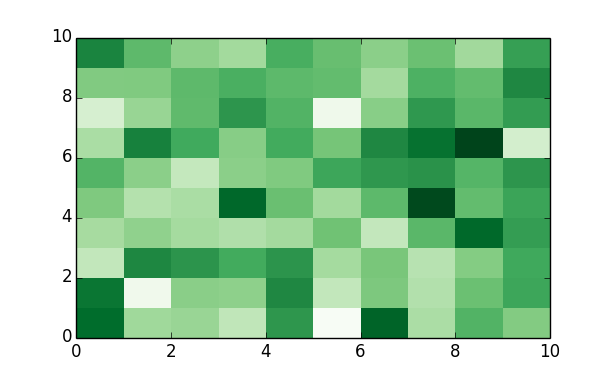
# DataFrame を引数として heatmap を描く関数を定義
def heatmap(df):
    import matplotlib.pyplot as plt
    fig, ax = plt.subplots()
    return ax.pcolor(df.values, cmap='Greens')

# heatmap(df) と同じ。
df.pipe(heatmap)
まとめ
イテレーション、関数適用、pipe について整理した。特に関数適用は データの前処理時に頻出するため、パターンを覚えておくと便利。
Pythonによるデータ分析入門 ―NumPy、pandasを使ったデータ処理
- 作者: Wes McKinney,小林儀匡,鈴木宏尚,瀬戸山雅人,滝口開資,野上大介
- 出版社/メーカー: オライリージャパン
- 発売日: 2013/12/26
- メディア: 大型本
- この商品を含むブログ (9件) を見る
